
Best Ricoh GR Apps for iPhone: Features and Camera Support Compared
On this page
Choose a Ricoh GR iPhone app by the job you need it to do: transfer originals, control the camera with live view, record locations, or prepare photos to share. Each app supports different features on each model, so check the model limits in the table.
We develop GR Snap. The entries for the other third-party apps summarize their App Store listings; we have not tested those apps.
Choose by task
- Free photo transfer: Image Sync for GR II / III / IIIx, or GR World for GR II / III / IIIx / IV.
- Official live-view remote on GR III / IIIx: Image Sync. GR World’s remote releases the shutter over Bluetooth but has no live view or exposure adjustment.
- Transfer plus location recording and framed sharing: GR Snap (paid).
- A transfer-focused alternative: compare GR Linker’s file and download workflow.
- Film recipes: compare GR Lab’s recipe tools.
- GR II remote shooting: Image Sync is not the remote solution. Ricoh’s separate GR Remote browser app was built for this camera; it is an older tool, so check compatibility with your current device. GR Remote Viewer is a separate third-party option.
Eight apps at a glance
| App | Charging model | What to compare | Important model limit |
|---|---|---|---|
| Image Sync, official | Free | Transfers and live-view remote | GR II transfers; GR III / IIIx remote; no GR IV |
| GR World, official | Free | Transfers, Bluetooth shutter, location | GR II transfers only; no live view |
| GR Snap | One-time purchase | Downloads, offline Library, GPS and Share Styles | GR II manual Wi-Fi; no Bluetooth wake or remote |
| GR Remote Viewer | Paid | Remote control, location and export destinations | GR II / III / IIIx listed; GR IV not listed |
| GR Linker | Paid | Multi-select and JPEG / RAW / MOV transfers | GR II / III / IIIx / IV, including HDF |
| GR Lover | Paid | Live view, Apple Watch shutter, location and frames | GR II / III / IIIx / IV; no Bluetooth on GR II |
| GR Lab | Free with in-app purchases | Recipes, transfers and live-view remote | II / III / IIIx / IV; recipe writing limited to II / IV |
| GR Link | Free | Transfers, live-view remote, recipes and collages | II / III / IIIx / IV listed; individual feature limits not detailed |
GR Snap
GR Snap downloads JPEG, DNG and MOV from the GR II, GR III, GR IIIx and GR IV, and keeps the downloaded photos browsable in its Library after the camera disconnects. A RAW+JPEG pair is saved as one asset in Apple Photos. On the GR III, IIIx and IV it wakes the camera over Bluetooth and has a live-view remote with tap to focus and exposure control; the GR II connects over Wi-Fi by hand and has no remote in GR Snap. It can also record a route while you shoot and fill in missing photo locations afterwards (how that works and its limits), and add a frame or shooting details to a photo before sharing (Share Styles).
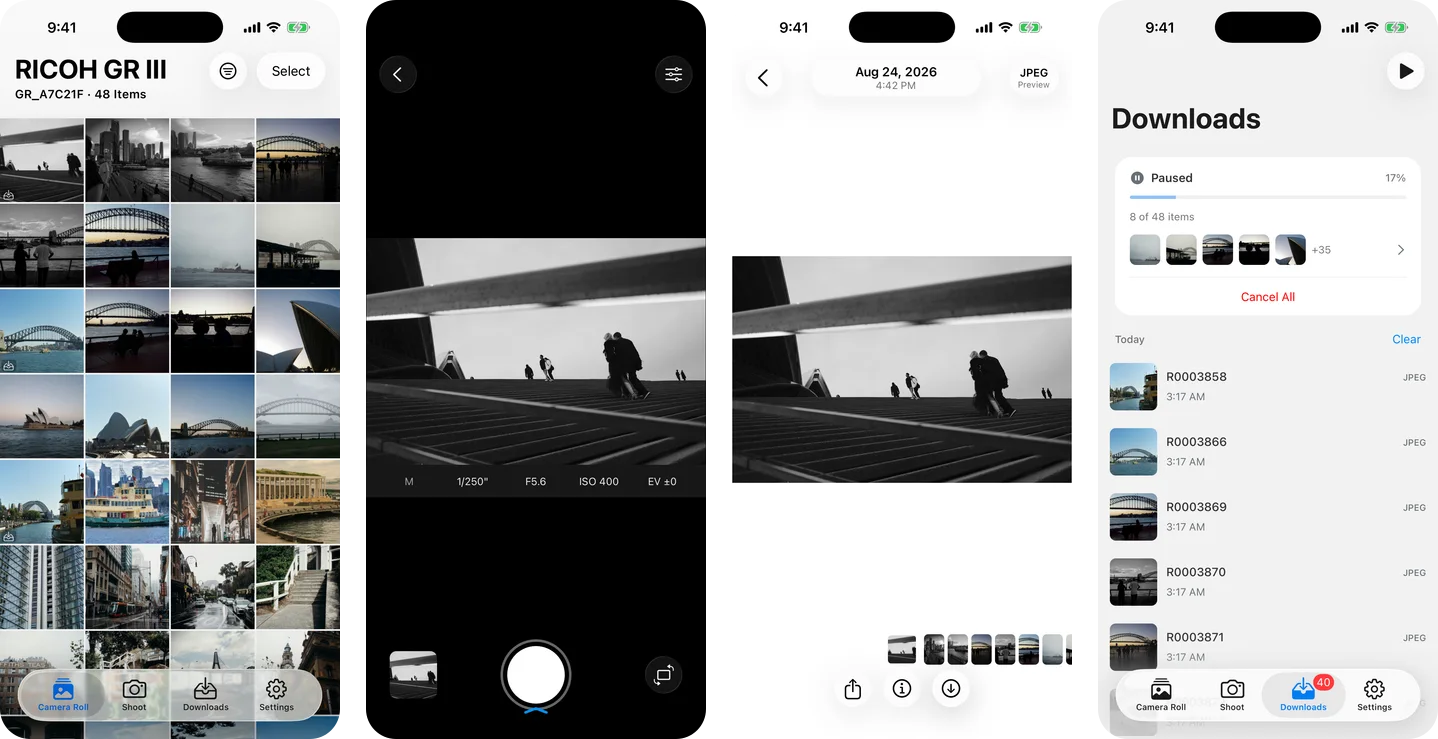
The trade-offs: it is paid, it does not manage film recipes or install camera firmware, and location repair needs a recorded route that covers the photo’s capture time.
GR Remote Viewer
Its listing describes JPEG, RAW and MOV downloads, focus and camera controls, adding locations to JPEGs, and access to saved files through iCloud Drive, FTP or WebDAV. It names GR II / III / IIIx; GR IV is not listed. This is worth comparing if your workflow includes remote shooting or moving saved photos to a computer.
GR Linker
The listing focuses on browsing camera files, selecting several photos with a swipe, and downloading several items at once into Photos. It names GR II / III / IIIx / IV, including HDF models, and JPEG, RAW and MOV. It does not describe a live-view remote.
GR Lover
The listing combines photo and video transfer with live view, exposure controls, an Apple Watch shutter, location tags and frames. It names GR II / III / IIIx / IV support and specifically excludes Bluetooth wake and powered-off transfer on GR II. It lists firmware update checking, not installation.
GR Lab
The listing combines a recipe library and recipe cards with transfers and live-view remote control. It lists GR II / III / IIIx / IV, but applying a saved recipe to the camera is limited to GR II and GR IV. It is free to download with membership and lifetime in-app purchases; check which tools your purchase unlocks.
GR Link
The listing describes RAW and JPEG transfer, live view with focus and exposure controls, recipe management, photo selection and collages. It lists GR II / III / IIIx / IV, including HDF and IV Monochrome. The page does not break down every feature by model.
Keep the official app for the tasks it supports
Ricoh’s GR World FAQ lists minimum firmware: GR III / HDF 2.00, GR IIIx / HDF 1.50, and GR II 1.10. GR World installs camera firmware on GR IV; GR III / IIIx owners use Ricoh’s support-site instructions. Its iOS transfers can stop about a minute after the app goes into the background, so keep it open while downloading.